
FieldPulse is a capable platform for growing multi trade shops, with real strength in estimating, job costing, and a long list of optional add ons. It is also a tool you cannot price without talking to a salesperson. Its own pricing page describes a seat based model and sends you to a custom quote, with no dollar amount anywhere on it.
If that is why you are searching, you are in good company. Most small service businesses want to see a number before they book a demo, and many want QuickBooks sync, text reminders, and a customer portal without paying extra for each one. This guide compares seven FieldPulse alternatives on published pricing wherever a vendor makes it public, and says plainly where a number is not available.
What FieldPulse actually costs
FieldPulse does not publish prices. Its pricing page says the platform is seat based, built around full access seats and limited field seats, and every request ends in a custom quote. Several premium products are sold as separate add ons: a phone and texting product called Engage, an AI assistant, a price book, payments, financing, fleet tracking, and custom forms.
Independent sites estimate an entry plan at roughly $89 a month plus about $30 per user, and say most shops should budget $40 to $75 per technician per month before add ons. Treat those as rough estimates, not FieldPulse’s own numbers. The only way to get a firm figure is a written quote, so ask specifically about add ons, setup or implementation fees, contract length, and renewal pricing.
Quick comparison table
| Tool | Best for | Entry price, billed monthly | Free trial |
|---|---|---|---|
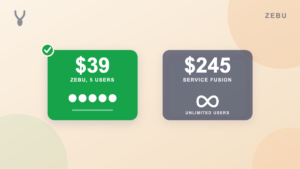
| Zebu | Published pricing, QuickBooks sync, and automation included | $39 per month, up to 5 users | 14 days, no card |
| FieldPulse | Multi trade shops that need deep estimating and job costing | Custom quote, priced per seat | Ask sales |
| Jobber | A polished app for solo and small teams | $49 per month, 1 user ($39 on annual) | 14 days, no card |
| Housecall Pro | Established teams that want a widely used app | $79 per month, 1 user | 14 days, no card |
| Kickserv | The simplest possible system | $60 per month, 5 users | 30 days |
| Service Fusion | Larger teams that want unlimited users on one plan | $245 per month, unlimited users | Demo only |
| Workiz | Businesses that run on inbound calls | Quote only, demo required | 7 days |
| ServiceTitan | Large contractors with 20 or more technicians | Custom, often $250 or more per tech, plus implementation | No |
Prices come from each vendor’s own public pricing page, on the entry plan billed month to month. Annual billing is cheaper on most of these tools. FieldPulse, Workiz, and ServiceTitan do not publish pricing. Always confirm current rates with the vendor.
What a five person crew actually pays
FieldPulse and Workiz are left out here because neither will give a number without a sales call. Everything below is a published price.
| Tool | Plan for 5 users | Monthly cost |
|---|---|---|
| Zebu | Starter, 5 users included | $39 |
| Kickserv | Start, 5 users included | $60 |
| Jobber | Connect, 5 users | $139 to $169 |
| Housecall Pro | Essentials, 5 users included | $189 |
| Service Fusion | Starter, unlimited users | $245 |
| ServiceTitan | Custom, 5 technicians | $1,250 or more, plus an implementation fee |
Want to run your own team size? The free field service software cost calculator compares these tools at 1, 5, 15, and 30 technicians.
1. Zebu
Best for: Teams that want a firm price today and QuickBooks sync, automation, and a customer portal without add ons.
Zebu covers the whole job: leads, quotes with electronic signature and deposits, a drag and drop dispatch board with driving routes, an offline capable technician app, invoicing, and online payment. Two way QuickBooks Online sync is included on every plan. Automated reminders, on my way notices, follow ups, and booking confirmations are included too, and text messaging is available after a one time carrier registration. Quotes track cost and price per line item and show live margin, which covers much of what small shops want from job costing.
Pricing: Starter $39 per month (up to 5 users), Growth $89 per month (up to 15 users), Pro $159 per month (up to 30 users). Additional users are $9 per month each. Free 14 day trial, no credit card. See Zebu pricing.
Pros:
- Published pricing, no sales call
- QuickBooks Online sync on every plan
- Dispatch board, online booking, and customer portal on every plan
- Five users included at the entry price
Cons:
- Estimating and assembly depth is lighter than FieldPulse’s for complex multi trade quotes
- A newer product with a smaller user community than Jobber or Housecall Pro
See the side by side at Zebu vs FieldPulse.
2. Jobber
Best for: A solo operator or small team that wants a polished, well supported app.
Jobber handles quoting, scheduling, invoicing, and payments, and its mobile app and support library are mature. It publishes its pricing. QuickBooks sync is gated to higher tiers, and extra users cost $29 per month each.
Pricing: Core $49 per month (1 user, $39 on annual), Connect $139, Grow $199, Plus $499. 14 day free trial.
Pros: Published pricing, polished app, large community.
Cons: Costs climb quickly past one user, and QuickBooks sync sits on a higher tier.
More in the Jobber alternatives guide.
3. Housecall Pro
Best for: Established teams that want a large, widely used app with a big feature set.
Housecall Pro is one of the best known names in the category and publishes entry pricing. Its QuickBooks Online sync is gated behind the $189 per month Essentials plan, not the $79 Basic plan.
Pricing: Basic $79 per month (1 user), Essentials $189 (up to 5 users). 14 day free trial.
Pros: Large user base, mature app, published pricing.
Cons: QuickBooks sync costs more than double the entry plan, and extra users are billed per seat.
More in the Housecall Pro alternatives guide.
4. Kickserv
Best for: The simplest possible system for a very small team.
Kickserv covers scheduling, estimates, invoicing, and basic customer management at a low price with five users included. It has no dispatch board, online booking, or customer portal of the depth the others offer.
Pricing: Start $60 per month (5 users). 30 day free trial.
Pros: Simple, five users included, long trial.
Cons: Thin automation and no customer portal.
More in the Kickserv alternatives guide.
5. Service Fusion
Best for: Larger teams that want unlimited users on one flat plan.
Service Fusion charges one price for unlimited users, which suits a bigger crew. The entry price is the highest published one on this list, and a demo is required to get started.
Pricing: Starter $245 per month, unlimited users.
Pros: Unlimited users, flat price.
Cons: The most expensive entry point here, no self serve trial.
6. Workiz
Best for: Businesses that run on inbound calls.
Workiz is built around a phone system, call tracking, and AI answering. Like FieldPulse, it no longer publishes dollar pricing.
Pricing: Quote only, demo required.
Pros: Strong call handling.
Cons: No published price, and no QuickBooks sync.
More in the Workiz alternatives guide.
7. ServiceTitan
Best for: Large contractors with 20 or more technicians.
ServiceTitan is the enterprise option, with deep reporting and a price to match, plus a separate implementation fee. It is built for large, established operations rather than small teams.
Pricing: Custom, often $250 or more per technician per month.
Pros: The deepest feature set in the category.
Cons: Far beyond most small business budgets and timelines.
More in the ServiceTitan alternatives guide.
How to choose
- Do you want a real price before talking to a salesperson? Zebu, Jobber, Housecall Pro, Kickserv, and Service Fusion publish theirs. FieldPulse, Workiz, and ServiceTitan do not.
- Do you need QuickBooks sync? Check which tier includes it. At Zebu it is on every plan. At Housecall Pro and Jobber it sits on a higher tier.
- How many users will you add in a year? Per seat pricing compounds. Count the office staff as well as the technicians.
- How complex are your estimates? If you quote large multi trade projects with assemblies, FieldPulse’s depth is a real reason to stay. If you quote straightforward service work, you probably do not need it.
For a longer framework, read how to choose field service management software, and if you decide to move, see how to switch without losing your data. See also what field service software really costs.
Frequently asked questions
How much does FieldPulse cost? FieldPulse does not publish pricing. It is seat based, with full access and limited field seats, and add ons such as phone and texting, an AI assistant, fleet tracking, and a price book sold separately. A written quote is the only firm answer. Independent estimates suggest roughly $40 to $75 per technician per month before add ons, but those are not FieldPulse’s own figures.
What is the best FieldPulse alternative for a small business? For a small team that wants a published price, Zebu starts at $39 a month for five users with QuickBooks sync included. Jobber and Housecall Pro are the best known options if you prefer a larger user base.
Does FieldPulse integrate with QuickBooks? Yes, FieldPulse lists a QuickBooks integration. Zebu includes two way QuickBooks Online sync on every plan.
Is Zebu cheaper than FieldPulse? Zebu is $39 a month for five users, published. FieldPulse requires a custom quote, so an exact comparison needs your quote in hand. Ask FieldPulse for the all in monthly number including add ons, then compare.
Does Zebu have job costing like FieldPulse? Zebu tracks cost and price on every quote line and shows live margin, and calculates labor cost from tracked time. FieldPulse goes deeper on assemblies and multi trade estimating.
Can I move my data from FieldPulse to Zebu? Yes. Zebu imports your client list, job and invoice history, and quotes from a CSV export, and the Pro plan includes a hands on migration.
The bottom line
FieldPulse is a good fit if deep estimating and job costing on complex multi trade work is the center of your business and you are comfortable with a sales process and a custom quote. If you want a price on the page, five users included, and QuickBooks sync, automation, and a customer portal without add ons, start a free 14 day trial of Zebu. No credit card and no demo required.