ZenMaid built its whole product around one job: recurring residential house cleaning. Digital checklists your cleaners actually use, calendar and map views built around a route, a Spotfinder tool that slots a new customer into an existing route instead of forcing you to rework the whole week, and an online booking form aimed squarely at a maid service. If your business is exactly that, one truck, one trade, recurring visits, ZenMaid is a real, purpose built option, not a generic tool with a cleaning label stuck on it.
Two things change the calculation for a lot of cleaning business owners looking at ZenMaid this year. First, its QuickBooks integration is still listed as coming soon on its own pricing page, meaning it is not a working feature you can use today, only a promise. Second, ZenMaid prices per team member on every paid plan, so the bill climbs every time you hire, even within the same plan, and SMS charges are billed separately from whatever that number already is.
If you are outgrowing ZenMaid’s narrow focus, need QuickBooks sync that actually works, or just want to see what a five person crew really pays across the category, this guide compares seven alternatives built for cleaning and other home service trades, with real published pricing wherever a vendor makes it public.
What ZenMaid actually costs
ZenMaid publishes its pricing directly, which is more than some tools on this list do. The catch is that the number changes with your headcount, not just your plan.
| Plan | Price at 1 person | Price at 5 people | What you get |
|---|---|---|---|
| Starter | $19 to $23 per month | Not available past a small team | Capped at 40 appointments a month, no checklists, GPS tracking, or reports |
| Pro | $39 per month | $53 per month | Unlimited appointments, checklists, GPS tracking, reports, online booking |
| Pro Max | Higher than Pro | Higher than Pro | Everything in Pro, plus a white label booking form and text message add ons |
SMS charges are billed separately from every plan’s listed price, and QuickBooks sync is marked coming soon on the Pro plan rather than a live feature.
Quick comparison table
| Tool | Best for | Entry price, billed monthly | Free trial |
|---|---|---|---|
| Zebu | Cleaning businesses that want QuickBooks sync that works today and a flat price that does not climb with headcount | $39 per month, up to 5 users | 14 days, no card |
| ZenMaid | Recurring residential house cleaning only, nothing else | $19 to $39 per month, scales with headcount | 14 days |
| Jobber | A solo cleaner or small team that wants a polished, well known app | $49 per month, 1 user ($39 on annual) | 14 days, no card |
| Housecall Pro | Established cleaning companies that want a large, widely used app | $79 per month, 1 user | 14 days, no card |
| Kickserv | The simplest possible system for a very small crew | $60 per month, 5 users | 30 days |
| Service Fusion | Cleaning companies that hire and lose staff often and want unlimited users | $245 per month, unlimited users | Demo only |
| Workiz | Businesses that live on inbound phone calls | Free for 2 users, then quote only | 7 days |
| FieldPulse | A cleaning company that also books other kinds of jobs and wants job costing | Custom, priced per technician | Yes |
Prices reflect each vendor’s own public pricing page, on the entry plan billed month to month. Annual billing is cheaper on most of these tools. Workiz and FieldPulse do not publish a fixed rate and require a sales conversation for a real number. Always confirm current rates directly with the vendor.
What a five person crew actually pays
A one person crew is one thing. Once you have a real team, per person pricing and coming soon features start to matter a lot more.
| Tool | Plan for 5 users | Monthly cost |
|---|---|---|
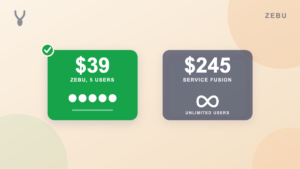
| Zebu | Starter, 5 users included, QuickBooks Online sync included | $39 |
| ZenMaid | Pro, price scales with team size, plus SMS billed separately, QuickBooks still coming soon | $53 |
| Kickserv | Start, 5 users included | $60 |
| Jobber | Connect, 5 users | $139 |
| Housecall Pro | Essentials, 5 users included, the lowest plan with QuickBooks sync | $189 |
| Service Fusion | Starter, unlimited users | $245 |
Workiz and FieldPulse are left out of this table for the same reason: neither will quote a firm number without a sales call, so there is nothing to compare directly.
1. Zebu
Best for: A cleaning business that wants QuickBooks Online sync that actually works today, a flat price that does not climb every time you hire, and room to add another trade later if you ever do.
Zebu covers the same recurring visit workflow ZenMaid is built around, with a drag and drop dispatch board that lays out real driving routes instead of a plain calendar, recurring job scheduling for weekly and biweekly cleans, digital checklists your team completes on the job, an online booking calendar, and a customer portal where clients approve quotes and pay online. The difference is what happens with your books. Zebu’s QuickBooks Online sync is a live feature on every plan, covering customers, invoices, payments, refunds, and processing fee splitting, not a feature marked coming soon on a pricing page.
Zebu also flips ZenMaid’s pricing model. Instead of the bill climbing with every hire, Zebu’s Starter plan includes five users at one flat price, and an AI chat assistant answers pricing and booking questions on your own request form around the clock, something ZenMaid does not offer.
Pricing: Starter $39 per month (up to 5 users), Growth $89 per month (up to 15 users), Pro $159 per month (up to 30 users). Additional users are $9 per month each. No implementation fee. Free 14 day trial, no credit card required.
Pros:
- QuickBooks Online sync that works today, not a coming soon feature
- Flat pricing per plan instead of a bill that climbs with every new hire
- Recurring jobs, checklists, and route friendly dispatch built for exactly this kind of work
- Online booking calendar and customer portal included on every plan
- Covers other trades too, useful if you ever add handyman, landscaping, or another service line
Cons:
- No Spotfinder style tool that automatically slots a new recurring client into an existing route
- Text reminders are available after a one time carrier registration and are billed per message
- Newer to the market than ZenMaid, which has focused on cleaning for longer
See a full side by side at Zebu vs ZenMaid.
2. Jobber
Best for: A solo cleaner or a very small crew that wants a polished, well known app with a large support community behind it.
Jobber covers quoting, scheduling, invoicing, and payments, and it is one of the most recognized names in home service software, cleaning included. It publishes its pricing directly and its mobile app is mature and well documented, but like ZenMaid, its pricing is per user, so a growing crew pays more with every hire.
Pricing: Core $49 per month (1 user, or $39 on an annual commitment), Connect $139 per month, Grow $199 per month, Plus $499 per month. Extra users $29 per month each. 14 day free trial, no card.
Pros:
- Published pricing with a large, well documented support community
- Strong for a one or two person crew at the entry price
- Broad feature set covering more than just cleaning if you diversify
Cons:
- No cleaning specific tools like checklists built into a job or a route optimizer for recurring visits
- Per seat pricing climbs quickly for a growing crew
- QuickBooks sync and automation features are reserved for higher tiers
See the full Jobber alternatives comparison for more detail.
3. Housecall Pro
Best for: An established cleaning company that wants a large, widely used app with a broad integration library.
Housecall Pro covers scheduling, dispatching, estimates, invoicing, online booking, and marketing, with an active community and one of the largest integration libraries in the category. It offers a real self serve trial and clear published pricing on most tiers, but like Jobber it is a general home service tool, not one built narrowly around a recurring cleaning route the way ZenMaid is.
Pricing: Basic $79 per month (1 user), Essentials $189 per month (5 users), MAX $329 per month (8 users). 14 day free trial, no card.
Pros:
- Published pricing you can see without a demo
- Large library of integrations and a built in consumer financing option
- Strong mobile apps with an offline mode for teams cleaning in low signal areas
Cons:
- Costs climb quickly once you add users past the entry plan
- Not purpose built for recurring residential cleaning the way ZenMaid is
- Automation and reminder features sit on higher tiers
4. Kickserv
Best for: A very small cleaning crew that wants the simplest possible tool and the longest free trial on this list.
Kickserv covers leads, estimates, scheduling, and invoicing with a long standing QuickBooks integration and a 30 day free trial, the longest of any tool here. It is a much simpler step down in complexity than ZenMaid’s cleaning specific feature set, useful if your business does not need route optimization or a Spotfinder style tool yet.
Pricing: Start $60 per month (5 users), Run $119 per month (10 users), Scale $199 per month (20 users). QuickBooks Online included on Start; QuickBooks Desktop needs the Run plan plus a $50 a month add on. 30 day free trial.
Pros:
- Published pricing with no demo required
- Longest free trial on this list at 30 days
- QuickBooks Online sync included on the entry plan
Cons:
- No cleaning specific checklists, route optimization, or Spotfinder style scheduling
- Basic calendar scheduling, not a real dispatch board
- Automation limited to a handful of reminder emails and texts
See the full Kickserv alternatives comparison for more detail.
5. Service Fusion
Best for: A cleaning company that hires and loses staff often and wants one flat price regardless of headcount.
Service Fusion takes a different approach than ZenMaid’s per person pricing: one flat monthly rate with unlimited users, so adding a new cleaner or losing one never moves the bill. That predictability comes at a real cost, since its entry plan starts well above what a five person cleaning crew pays almost anywhere else on this list.
Pricing: Starter $245 per month, Plus $382 per month, Pro $627 per month, all with unlimited users, all month to month. Demo only, no self serve trial.
Pros:
- Unlimited users on every plan, useful if headcount changes often
- Predictable cost as your crew grows
- A phone module included, closer to a call center than most cleaning specific tools
Cons:
- Considerably more expensive than most alternatives for a small cleaning crew
- No self serve trial, requires a demo before you see the product
- Not built specifically for cleaning, so recurring route tools are more generic
6. Workiz
Best for: A cleaning company that runs heavily on inbound phone calls and wants call tracking built in.
Workiz centers its product on the phone system: call recording, ad to call tracking so you know which campaign actually drove the lead, and an AI answering feature on its higher tiers. That is a different pitch than ZenMaid’s route and checklist focus, and a better fit if most of your new cleaning clients call in rather than book online.
Pricing: Free Lite plan for up to 2 users. Standard, Pro, and Ultimate plans are all quote only, gated behind a demo request, with phone lines, SMS credits, and payment processing billed separately on top.
Pros:
- Built in phone system, call recording, and ad to call tracking
- A free plan for a very small team just getting started
- AI answering available on higher tiers for call heavy businesses
Cons:
- No published pricing above the free plan, a demo is required for a real number
- Not purpose built for cleaning the way ZenMaid, or Zebu’s cleaning workflows, are
- SMS and payment processing billed separately from whatever number a demo gives you
See the full Workiz alternatives comparison for more detail.
7. FieldPulse
Best for: A cleaning company that also books other kinds of jobs and wants stronger job costing than ZenMaid offers.
FieldPulse is priced per technician and, like Workiz, does not publish rates on its own site. Its estimating and job costing tools go deeper than ZenMaid’s, aimed at operations that book more than one kind of job rather than a business that is purely recurring house cleaning.
Pricing: Custom, priced per technician, with a real cost typically in the low hundreds per month for a small team. Trial available, custom quote required for full pricing.
Pros:
- Stronger estimating and job costing than a cleaning only tool typically offers
- A real step up path if you plan to add other kinds of jobs beyond cleaning
- Trial available without a full demo first
Cons:
- No published pricing, same gap as ZenMaid’s own coming soon QuickBooks feature creates on the accounting side
- Per technician pricing climbs as you grow, similar to ZenMaid’s per person model
- Not purpose built for a pure recurring cleaning route the way ZenMaid is
How to choose the right ZenMaid alternative
- Is your business only recurring residential cleaning, or does it do more? If it is only cleaning and will likely stay that way, ZenMaid’s narrow focus is a real strength. If you already do move out cleans, one time deep cleans priced differently, or you might add another service line later, a broader tool like Zebu, Jobber, or Housecall Pro fits better.
- Do you need QuickBooks sync that works today? ZenMaid’s own pricing page still lists its QuickBooks integration as coming soon. Zebu, Housecall Pro (at the Essentials plan and up), and Kickserv all offer a working QuickBooks connection right now.
- Does the pricing model punish you for hiring? ZenMaid, Jobber, and FieldPulse all price per person, so growth increases the bill on every plan. Zebu’s flat plans and Service Fusion’s unlimited user plans do not.
- Do you want a real price before you talk to a salesperson? Zebu, ZenMaid, Jobber, Housecall Pro, and Kickserv all publish pricing you can see today. Workiz and FieldPulse require a conversation for a real number.
- What does your team actually need on the job? Checklists, a route friendly dispatch view, and an online booking form matter more for a cleaning crew than a phone system or enterprise reporting. Match the tool to the job, not the other way around.
For a deeper walkthrough of these criteria specific to cleaning businesses, see the best cleaning business software guide, or the general guide on how to choose field service management software.
How to move off ZenMaid without losing your history
- Export your client list, job history, and invoices from ZenMaid before you cancel, even if you have not picked a new tool yet.
- Confirm the new tool actually imports that data, not just your client contacts. Zebu imports your client list, job and invoice history, and quotes from a CSV export.
- Move your active recurring routes in first, then bring over older, one time job history as you have time.
- Run your team through the new app for a week before your ZenMaid subscription ends, so nothing falls through the gap between the two.
- Tell your clients nothing changes on their end. Their booking confirmations, invoices, and payment links still arrive the same way.
See the full guide on switching field service software without losing your data for the complete migration order.
Frequently asked questions
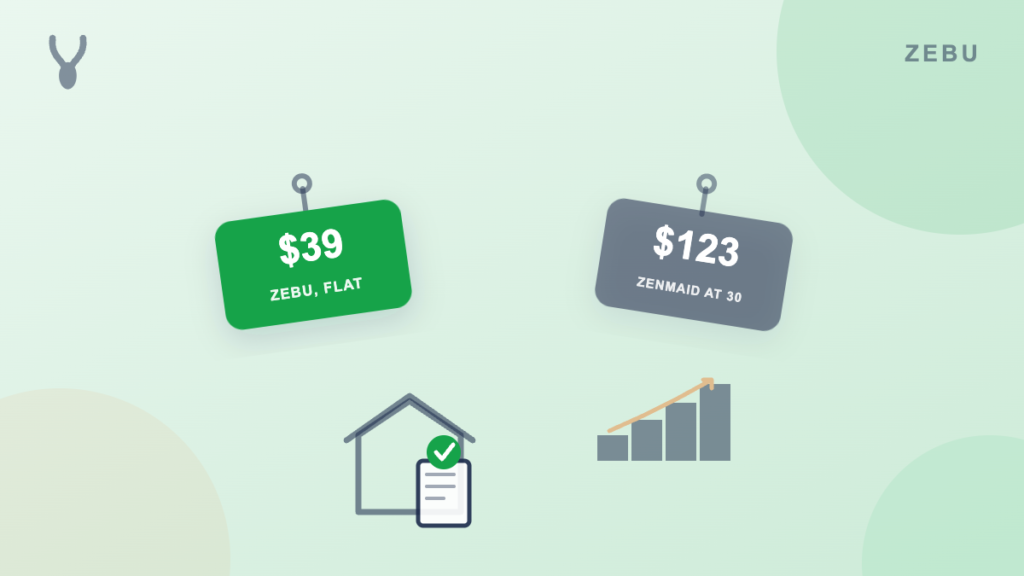
How much does ZenMaid cost? ZenMaid’s Starter plan runs $19 to $23 a month for a very small team, capped at 40 appointments a month with no checklists, GPS tracking, or reports. Its Pro plan starts at $39 a month for one person and climbs with headcount, reaching $53 a month at five people and $123 a month at thirty, plus SMS charges billed separately.
Does ZenMaid have a QuickBooks integration? Not yet as a working feature. ZenMaid’s own pricing page lists a QuickBooks integration on its Pro plan marked coming soon. Zebu includes two way QuickBooks Online sync, covering customers, invoices, payments, refunds, and processing fee splitting, on every plan starting at $39 a month.
Is Zebu or ZenMaid cheaper? For a single person, ZenMaid Pro and Zebu Starter are both $39 a month. At five people, ZenMaid Pro is $53 a month plus separate SMS charges, since ZenMaid’s price scales with headcount, while Zebu stays $39 a month flat for up to five users. ZenMaid’s cheaper Starter plan caps out at 40 appointments a month and skips checklists, GPS tracking, and reports.
Is ZenMaid good for anything other than cleaning? No. ZenMaid is built specifically for residential maid and cleaning services. If your business does more than recurring house cleans, or might expand into another trade later, a broader tool like Zebu covers cleaning as well as HVAC, plumbing, electrical, and landscaping.
Does ZenMaid charge extra for text messages? Yes. Every ZenMaid plan lists its price with SMS charges billed separately, so text reminders to clients and cleaners cost extra on top of the plan. Zebu’s automated reminders send by email at no extra cost, and text messaging is available after a one time carrier registration, billed per message.
Can I move my data from ZenMaid to another tool? Yes. Zebu imports your client list, job and invoice history, and quotes from a CSV export. The Pro plan includes a hands on migration handled by our team, so you do not have to touch a spreadsheet yourself.
The bottom line
ZenMaid earns its place as a real, purpose built option if your business is only recurring residential house cleaning and stays that way. But its QuickBooks sync is still a coming soon promise, not a working feature, and its per person pricing means every hire raises the bill.
If you want QuickBooks Online sync that works today, a flat price that does not climb with headcount, and room to grow into other trades later, start a free 14 day trial of Zebu. No credit card, no demo required.